Because I had some difficulty learning the keyboard shortcut to toggle English/Greek, I want to report my experience.
The default shortcut, as I learned is Winkey-Space, but at first it didn’t work as I expected. After experimentation, I found that the shortcut functions only when a window is ready to receive keyboard input.
The other peculiarity is that I have to strike Win-Space twice, to cause a change in the input method.
The shortcut can be configured in Preferences (or run ibus-setup).
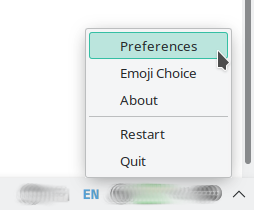
One can write a simple script and assign it to a preferred shortcut. For example, in case of Galaxie Greek (Phonetic):
#!/bin/sh
ibus engine grc-Grek:/home/user/.local/share/keyman/galaxie_greek_positional/galaxie_greek_positional.kmx
I’m not familiar with Cinnamon, but somewhere in the global settings should be a section for custom shortcuts.
the shortcut functions only when a window is ready to receive keyboard input
Yes, it’s annoying. But using the custom script, you can switch even if the cursor is not in the input field.
P.S. Use this command to find your keyboard: ibus list-engine | grep grc
P.S.S. Custom shortcuts for Cinnamon: guide.
Very helpful will.dawe. I was totally ignorant of ibus. I can see I should learn more about this, and you’ve given me a good start.
Have you found a way to limit the keyman greek input to a single window?
For example: to type Greek in a text editor, and toggle Greek/English only in the text editor window.
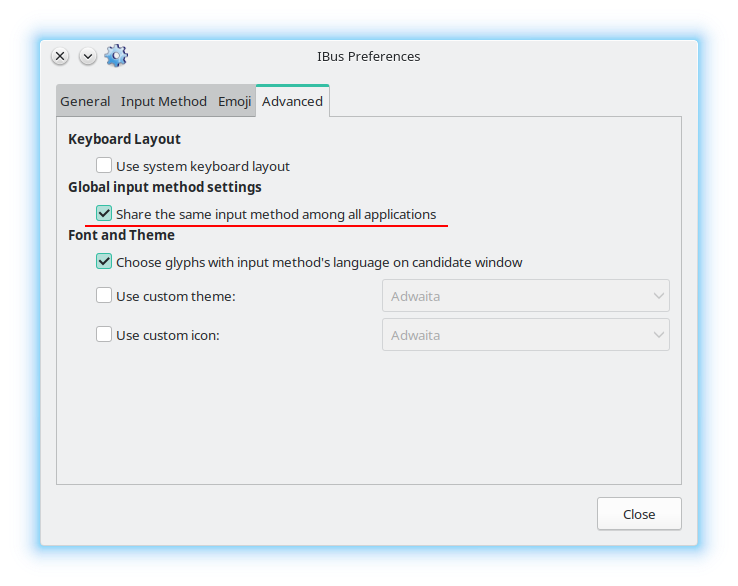
There are only two options (ibus preferencies | advanced):
- ☒ global layout: if you set Greek, then in all other applications you will type Greek; set to English means it will set English layout in all apps;
- ☐ independent layout: you can set different layouts in different applications.
But you can’t exclude Greek from the list of layouts in some applications. Every app has access to the full list of keyboard layouts.
P.S. Maybe this topic will give you an idea how to realize what you want.
Many thanks the hints and suggestions will.dawe.